前言

上一节我们分析了 GASDocumentation 中与 GAS 相关的一些类的设计,本节就开始分析具体技能的实现。

技能的实现

查看 BP_HeroCharacter 蓝图,会发现在 Abilities.CharacterAbilities 下挂载了 7 个技能,上一节也分析过,CharacterAbilities 会在开局就全部赋予玩家,让我们一一分析。

3.png

Jump

项目中,为了演示非实例化的技能是如何使用的,把 Jump 也作为一个技能配置了,这个技能是 C++ 实现的。查看相应的类:

1
2
3
4
5
6
7
8
9
10
11
12
13
14
15
16
17
18
19
20
21
22
23
24
25
26
27
28
29
30
31
32
33
34
35
36
/**
* Makes the Character try to jump using the standard Character->Jump.
* This is an example of a non-instanced ability.
*/
UCLASS()
class GASDOCUMENTATION_API UGDGA_CharacterJump : public UGDGameplayAbility
{
GENERATED_BODY()

public:
UGDGA_CharacterJump();

virtual void ActivateAbility(
const FGameplayAbilitySpecHandle Handle,
const FGameplayAbilityActorInfo* ActorInfo,
const FGameplayAbilityActivationInfo ActivationInfo,
const FGameplayEventData* TriggerEventData) override;

virtual bool CanActivateAbility(
const FGameplayAbilitySpecHandle Handle,
const FGameplayAbilityActorInfo* ActorInfo,
const FGameplayTagContainer* SourceTags = nullptr,
const FGameplayTagContainer* TargetTags = nullptr,
OUT FGameplayTagContainer* OptionalRelevantTags = nullptr) const override;

virtual void InputReleased(
const FGameplayAbilitySpecHandle Handle,
const FGameplayAbilityActorInfo* ActorInfo,
const FGameplayAbilityActivationInfo ActivationInfo) override;

virtual void CancelAbility(
const FGameplayAbilitySpecHandle Handle,
const FGameplayAbilityActorInfo* ActorInfo,
const FGameplayAbilityActivationInfo ActivationInfo,
bool bReplicateCancelAbility) override;
};

会发现 GDGA_CharacterJump 就是继承自 UGDGameplayAbility 并且重写了 UGameplayAbility 中的一些函数来控制技能的流程。

1
2
3
4
5
6
UGDGA_CharacterJump::UGDGA_CharacterJump()
{
AbilityInputID = EGDAbilityInputID::Jump;
InstancingPolicy = EGameplayAbilityInstancingPolicy::NonInstanced;
AbilityTags.AddTag(FGameplayTag::RequestGameplayTag(FName("Ability.Jump")));
}

在构造函数方面,将 AbilityInputID 绑定至相应的枚举,这样就能通过按键来触发技能了。

1
2
3
4
5
6
7
8
9
10
11
12
13
14
15
16
17
void UGDGA_CharacterJump::ActivateAbility(
const FGameplayAbilitySpecHandle Handle,
const FGameplayAbilityActorInfo * ActorInfo,
const FGameplayAbilityActivationInfo ActivationInfo,
const FGameplayEventData * TriggerEventData)
{
if (HasAuthorityOrPredictionKey(ActorInfo, &ActivationInfo))
{
if (!CommitAbility(Handle, ActorInfo, ActivationInfo))
{
EndAbility(CurrentSpecHandle, CurrentActorInfo, CurrentActivationInfo, true, true);
}

ACharacter * Character = CastChecked<ACharacter>(ActorInfo->AvatarActor.Get());
Character->Jump();
}
}

ActivateAbility 我们终于看到了 Jump 技能的真正实现:Character->Jump();。没错,这个技能就是转调用了 Character 自带的 Jump 而已。其他的几个函数就不分析了,都是关于 Ability 取消与停止的一些函数,可以学习一下作者的条件判断。

OK,花了这么大的精力,我们终于实现了跳的功能,不过这可是由 GAS 实现的 Jump,无论是解耦还是可拓展性都很高。

FireGun

分析完了 Jump,我们再来看看 FireGun 功能的实现,这个功能也是利用 C++ 实现的,定义在 GDGA_FireGun.h 中。案例中的玩家控制角色与 AI 角色的所有动画都是持枪的状态,红色与蓝色的小兵则没有持枪。与此相对的,BP_HeroCharacter 的蓝图中,角色要多出一个 Gun_Compotent 的组件,实际上就只是一个 SkeletalMesh Component 而已。

这一点在 GDHeroCharacter.h 中也可以看到:

1
2
3
4
UPROPERTY(BlueprintReadOnly, VisibleAnywhere)
USkeletalMeshComponent* GunComponent;

USkeletalMeshComponent* GetGunComponent() const;

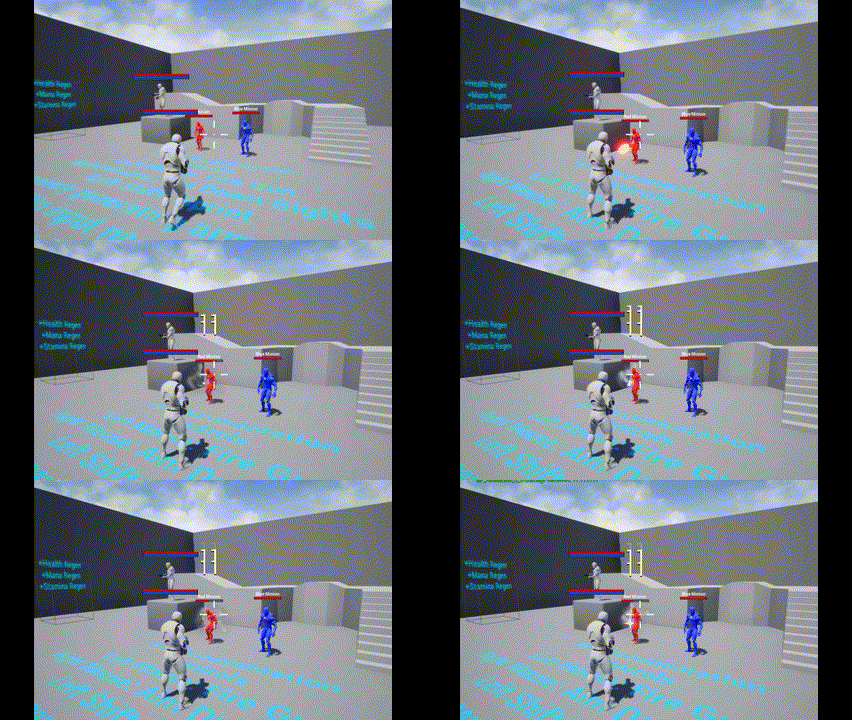
因此,FireGun 技能的作用就是玩家按下鼠标左键时在 Gun_CompotentMuzzle 位置生成一颗子弹,再处理伤害计算、命中特效、玩家被击中的效果等,让我们来看看用 GAS 如何实现这些。

查看 GDGA_FireGun.h,发现这个类也继承自 GDGameplayAbility,并且多出了一些成员的定义。

先看一下成员变量的定义,这里定义了两个 Montage,分别对应不瞄准与瞄准的开枪动画,并且在 ProjectileClass 中存放生成的子弹类,DamageGameplayEffect 则是一个计算伤害的 GE。至于 Range 与 Damage,则是控制子弹的射程与伤害的变量了。

1
2
3
4
5
6
7
8
9
10
11
12
13
14
15
16
17
18
19
20
21
public:
UGDGA_FireGun();

UPROPERTY(BlueprintReadOnly, EditAnywhere)
UAnimMontage* FireHipMontage;

UPROPERTY(BlueprintReadOnly, EditAnywhere)
UAnimMontage* FireIronsightsMontage;

UPROPERTY(BlueprintReadOnly, EditAnywhere)
TSubclassOf<AGDProjectile> ProjectileClass;

UPROPERTY(BlueprintReadOnly, EditAnywhere)
TSubclassOf<UGameplayEffect> DamageGameplayEffect;

protected:
UPROPERTY(BlueprintReadOnly, EditAnywhere)
float Range;

UPROPERTY(BlueprintReadOnly, EditAnywhere)
float Damage;

构造函数

再来查看该技能的构造函数部分。

1
2
3
4
5
6
7
8
9
10
11
12
13
UGDGA_FireGun::UGDGA_FireGun()
{
InstancingPolicy = EGameplayAbilityInstancingPolicy::InstancedPerActor;

FGameplayTag Ability1Tag = FGameplayTag::RequestGameplayTag(FName("Ability.Skill.Ability1"));
AbilityTags.AddTag(Ability1Tag);
ActivationOwnedTags.AddTag(Ability1Tag);

ActivationBlockedTags.AddTag(FGameplayTag::RequestGameplayTag(FName("Ability.Skill")));

Range = 1000.0f;
Damage = 12.0f;
}

这里将 Ability.Skill.Ability1 标签赋予玩家,并在 BlockedTags 中赋予 Ability.Skill,这就意味着玩家在释放任意技能,即拥有任何 Ability.Skill 标签或它的子标签时,都不允许释放其他技能。

通过简单的 Tag 组合,即可实现复杂的效果,这就是 Tag 系统的精妙之处。

此外构造函数中还设置了子弹的范围及伤害。

ActivateAbility

再来查看该技能是如何触发的,即 UGDGA_FireGun::ActivateAbility 函数的实现:

1
2
3
4
5
6
7
8
9
10
11
12
13
14
15
16
17
18
19
20
21
22
23
24
25
26
27
28
29
30
31
32
33
34
35
36
void UGDGA_FireGun::ActivateAbility(
const FGameplayAbilitySpecHandle Handle,
const FGameplayAbilityActorInfo * ActorInfo,
const FGameplayAbilityActivationInfo ActivationInfo,
const FGameplayEventData * TriggerEventData)
{
if (!CommitAbility(Handle, ActorInfo, ActivationInfo))
{
EndAbility(CurrentSpecHandle, CurrentActorInfo, CurrentActivationInfo, true, true);
}

UAnimMontage* MontageToPlay = FireHipMontage;

if (GetAbilitySystemComponentFromActorInfo()->
HasMatchingGameplayTag(FGameplayTag::RequestGameplayTag(FName("State.AimDownSights"))) &&
!GetAbilitySystemComponentFromActorInfo()->
HasMatchingGameplayTag(FGameplayTag::RequestGameplayTag(FName("State.AimDownSights.Removal"))))
{
MontageToPlay = FireIronsightsMontage;
}

// Play fire montage and wait for event telling us to spawn the projectile
UGDAT_PlayMontageAndWaitForEvent* Task =
UGDAT_PlayMontageAndWaitForEvent::PlayMontageAndWaitForEvent(
this, NAME_None, MontageToPlay, FGameplayTagContainer(), 1.0f, NAME_None, false, 1.0f);

Task->OnBlendOut.AddDynamic(this, &UGDGA_FireGun::OnCompleted);
Task->OnCompleted.AddDynamic(this, &UGDGA_FireGun::OnCompleted);
Task->OnInterrupted.AddDynamic(this, &UGDGA_FireGun::OnCancelled);
Task->OnCancelled.AddDynamic(this, &UGDGA_FireGun::OnCancelled);
Task->EventReceived.AddDynamic(this, &UGDGA_FireGun::EventReceived);

// ReadyForActivation() is how you activate the AbilityTask in C++.
// Blueprint has magic from K2Node_LatentGameplayTaskCall that will automatically call ReadyForActivation().
Task->ReadyForActivation();
}

乍一看十分复杂,我们先不管 MontageToPlay 的选择部分,直接看最为核心的一段:

1
2
3
4
5
6
7
8
9
10
11
12
13
14
// Play fire montage and wait for event telling us to spawn the projectile
UGDAT_PlayMontageAndWaitForEvent* Task =
UGDAT_PlayMontageAndWaitForEvent::PlayMontageAndWaitForEvent(
this, NAME_None, MontageToPlay, FGameplayTagContainer(), 1.0f, NAME_None, false, 1.0f);

Task->OnBlendOut.AddDynamic(this, &UGDGA_FireGun::OnCompleted);
Task->OnCompleted.AddDynamic(this, &UGDGA_FireGun::OnCompleted);
Task->OnInterrupted.AddDynamic(this, &UGDGA_FireGun::OnCancelled);
Task->OnCancelled.AddDynamic(this, &UGDGA_FireGun::OnCancelled);
Task->EventReceived.AddDynamic(this, &UGDGA_FireGun::EventReceived);

// ReadyForActivation() is how you activate the AbilityTask in C++.
// Blueprint has magic from K2Node_LatentGameplayTaskCall that will automatically call ReadyForActivation().
Task->ReadyForActivation();

可以看到,这里直接声明了一个 UGDAT_PlayMontageAndWaitForEvent* 类型的 Task 并且绑定了一堆回调,并且在最后让 Task 处于 Ready 状态,按注释来看的话,激活 FireGun 技能就相当于启动了这个 Task。

Task

以下是 GasDocumentation_Chinese 中关于 Task 的介绍,放在这里方便查看:

  1. AbilityTask 定义

GameplayAbility只能在一帧中执行, 这本身并不能提供太多灵活性, 为了实现随时间推移而触发或响应一段时间后触发的委托操作, 我们需要使用AbilityTask

GAS 自带很多AbilityTask:

  • 使用RootMotionSource移动Character的Task
  • 播放动画蒙太奇的Task
  • 响应Attribute变化的Task
  • 响应GameplayEffect变化的Task
  • 响应玩家输入的Task
  • 更多

UAbilityTask的构造函数中强制硬编码允许最多 1000 个同时运行的AbilityTask, 当设计那些同时拥有数百个 Character 的游戏(像RTS)的 GameplayAbility 时要注意这一点。

  1. 自定义 AbilityTask

通常你需要创建自己的自定义AbilityTask(C++中)。 样例项目带有两个自定义 AbilityTask:

PlayMontageAndWaitForEvent 是默认 PlayMontageAndWaitWaitGameplayEventAbilityTask 的结合体, 其允许动画蒙太奇自 AnimNotify 发送 GameplayEvent 回到启动它的 GameplayAbility, 可以使用该 Task 在动画蒙太奇的某个特定时刻来触发操作。

WaitReceiveDamage可以监听OwnerActor接收伤害。当英雄接收到一个伤害实例时, 被动护甲层GameplayAbility 就会移除一层护甲。

AbilityTask 的组成:

  • 创建新的 AbilityTask 实例的静态函数
  • 当 AbilityTask 完成目的时分发的委托(Delegate)
  • 进行主要工作的 Activate() 函数, 绑定到外部的委托等等
  • 进行清理工作的OnDestroy()函数, 包括其绑定到外部的委托
  • 所有绑定到外部委托的回调函数
  • 成员变量和所有内部辅助函数

Note: AbilityTask只能声明一种类型的输出委托, 所有的输出委托都必须是该种类型, 不管它们是否使用参数. 对于未使用的委托参数会传递默认值。

AbilityTask 只能运行在那些运行所属 GameplayAbility 的客户端或服务端, 然而, 可以通过设置 bSimulatedTask = true 使AbilityTask 运行在 Simulated Client 上, 在 AbilityTask 的构造函数中, 重写 virtual void InitSimulatedTask(UGameplayTasksComponent& InGameplayTasksComponent); 并将所有成员变量设置为同步的, 这只在极少的情况下有用, 比如在移动AbilityTask 中, 不想同步每次移动变化, 但是又需要模拟整个移动 AbilityTask, 所有的 RootMotionSource AbilityTask 都是这样做的, 查看 AbilityTask_MoveToLocation.h/.cpp 以作为参考范例。

如果你在 AbilityTask 的构造函数中设置了 bTickingTask = true; 并重写了 virtual void TickTask(float DeltaTime);, AbilityTask 就可以使用 Tick, 这在你需要根据帧率平滑线性插值的时候很有用. 查看 AbilityTask_MoveToLocation.h/.cpp 以作为参考范例。

可以看出,这里使用到的 PlayMontageAndWaitForEvent 是 GAS 中自带的两个 Task 的结合体,负责播放动画并接收事件,直至能力结束或动画播放结束(需手动指定回调),关于 GDAT_PlayMontageAndWaitForEvent.h /.cpp 就不再分析了。属于是心有余而力不足,这里暂且把它当成 BlackBox 看待。

回调函数

上文说到,Task 绑定了许多回调函数用于技能流程的控制,这里分析一下这些回调函数:

1
2
3
4
5
Task->OnBlendOut.AddDynamic(this, &UGDGA_FireGun::OnCompleted);
Task->OnCompleted.AddDynamic(this, &UGDGA_FireGun::OnCompleted);
Task->OnInterrupted.AddDynamic(this, &UGDGA_FireGun::OnCancelled);
Task->OnCancelled.AddDynamic(this, &UGDGA_FireGun::OnCancelled);
Task->EventReceived.AddDynamic(this, &UGDGA_FireGun::EventReceived);

可以看出,无论是动画 BlendOut 或者是 Task 本身结束都会调用 OnCompleted,被打断或取消会调用 OnCancelled,接收到动画的事件时会调用 EventReceived

并且可以看到这些回调函数确实都是同种类型。

1
2
3
4
5
6
7
8
9
10
11
void UGDGA_FireGun::OnCancelled(FGameplayTag EventTag, FGameplayEventData EventData)
{
EndAbility(CurrentSpecHandle, CurrentActorInfo, CurrentActivationInfo, true, true);
}

void UGDGA_FireGun::OnCompleted(FGameplayTag EventTag, FGameplayEventData EventData)
{
EndAbility(CurrentSpecHandle, CurrentActorInfo, CurrentActivationInfo, true, false);
}

void UGDGA_FireGun::EventReceived(FGameplayTag EventTag, FGameplayEventData EventData);

这里单独分析一下 EventReceived,可以看出该函数处理了两种 EventtagEvent.Montage.EndAbilityEvent.Montage.SpawnProjectile,分别用于结束技能与发射子弹。我们也终于看到了熟悉的方向计算与 GetWorld()->SpawnActorDeferred<T>

这里之所以使用 SpawnActorDeferred 是为了先进行一些配置再手动调用 Projectile->FinishSpawning(MuzzleTransform) 完成生成。

1
2
3
4
5
6
7
8
9
10
11
12
13
14
15
16
17
18
19
20
21
22
23
24
25
26
27
28
29
30
31
32
33
34
35
36
37
38
39
40
41
42
43
44
45
46
47
48
49
50
void UGDGA_FireGun::EventReceived(FGameplayTag EventTag, FGameplayEventData EventData)
{
// Montage told us to end the ability before the montage finished playing.
// Montage was set to continue playing animation even after ability ends so this is okay.
if (EventTag == FGameplayTag::RequestGameplayTag(FName("Event.Montage.EndAbility")))
{
EndAbility(CurrentSpecHandle, CurrentActorInfo, CurrentActivationInfo, true, false);
return;
}

// Only spawn projectiles on the Server.
// Predicting projectiles is an advanced topic not covered in this example.
if (GetOwningActorFromActorInfo()->GetLocalRole() == ROLE_Authority &&
EventTag == FGameplayTag::RequestGameplayTag(FName("Event.Montage.SpawnProjectile")))
{
AGDHeroCharacter* Hero = Cast<AGDHeroCharacter>(GetAvatarActorFromActorInfo());
if (!Hero)
{
EndAbility(CurrentSpecHandle, CurrentActorInfo, CurrentActivationInfo, true, true);
}

FVector Start = Hero->GetGunComponent()->GetSocketLocation(FName("Muzzle"));
FVector End = Hero->GetCameraBoom()->GetComponentLocation() +
Hero->GetFollowCamera()->GetForwardVector() * Range;
FRotator Rotation = UKismetMathLibrary::FindLookAtRotation(Start, End);

FGameplayEffectSpecHandle DamageEffectSpecHandle =
MakeOutgoingGameplayEffectSpec(DamageGameplayEffect, GetAbilityLevel());

// Pass the damage to the Damage Execution Calculation through a SetByCaller value
// on the GameplayEffectSpec
DamageEffectSpecHandle.Data.Get()->SetSetByCallerMagnitude(
FGameplayTag::RequestGameplayTag(FName("Data.Damage")), Damage);

FTransform MuzzleTransform = Hero->GetGunComponent()->GetSocketTransform(FName("Muzzle"));
MuzzleTransform.SetRotation(Rotation.Quaternion());
MuzzleTransform.SetScale3D(FVector(1.0f));

FActorSpawnParameters SpawnParameters;
SpawnParameters.SpawnCollisionHandlingOverride = ESpawnActorCollisionHandlingMethod::AlwaysSpawn;

AGDProjectile* Projectile = GetWorld()->SpawnActorDeferred<AGDProjectile>(
ProjectileClass, MuzzleTransform, GetOwningActorFromActorInfo(),
Hero, ESpawnActorCollisionHandlingMethod::AlwaysSpawn);

Projectile->DamageEffectSpecHandle = DamageEffectSpecHandle;
Projectile->Range = Range;
Projectile->FinishSpawning(MuzzleTransform);
}
}

除了生成 Projectile 之外,还有一些陌生的操作。首先,使用成员变量 DamageGameplayEffect(GE)创建了一个 DamageEffectSpecHandle 并且将当前子弹的伤害 Damage 通过 SetSetByCallerMagnitude 传递给了一个 Tag 为 Data.Damage 的变量,最后再将 DamageEffectSpecHandle 赋给生成的子弹,这样一来子弹就携带了伤害信息。

施加伤害时获取到这个 DamageEffectSpecHandle 再通过 .GetSetByCallerMagnitude() 的方法就可以获取伤害信息了。

至于 DamageEffectSpecHandle 具体代表什么意思,以目前能够理解的程度来看就是一个带有 DamageEffect 等信息的结构体,内部做了一些优化,可能是引用之类的优化吧,使得在传递过程中不用一直复制。

1
2
3
4
5
6
7
8
9
FGameplayEffectSpecHandle DamageEffectSpecHandle = 
MakeOutgoingGameplayEffectSpec(DamageGameplayEffect, GetAbilityLevel());

// Pass the damage to the Damage Execution Calculation through a SetByCaller value
// on the GameplayEffectSpec
DamageEffectSpecHandle.Data.Get()->SetSetByCallerMagnitude(
FGameplayTag::RequestGameplayTag(FName("Data.Damage")), Damage);

Projectile->DamageEffectSpecHandle = DamageEffectSpecHandle;

动画

OK,代码部分分析完毕,来看一下动画部分到底是如何将 EventTag 传递给 Actor 的。我们打开其中一个 Montage,就会发现在动画的流程中触发了两个 Notify,看名字就知道分别负责生成子弹以及结束 Ability,与 EventReceived() 中处理的两个 Tag 相对应。

这里的播放音效以及 EndAbility 的位置都被博主自己调整了。

image.png

这两个 Noitfy 都是 AnimNotify_GenericEventByTag 类型,这个类型使用蓝图实现,非常简单。就是将指定的 EventTag 发送给 Actor。

image.png

这样就使用 GAS 的方式完成了子弹的生成以及技能的结束。

值得一提的是,由于上文中在 ActivationBlockedTags 中增加了 Ability.Skill 以及在技能激活状态下会赋予玩家 Ability.Skill.Ability1。因此 Event.Montage.EndAbility 的位置也可以间接决定玩家的 FireRate,因为在 EndAbility 之前玩家一直都会有 Ability1 这个 Tag,不会再次触发技能。

1
2
3
FGameplayTag Ability1Tag = FGameplayTag::RequestGameplayTag(FName("Ability.Skill.Ability1"));
ActivationOwnedTags.AddTag(Ability1Tag);
ActivationBlockedTags.AddTag(FGameplayTag::RequestGameplayTag(FName("Ability.Skill")));

DamageGameplayEffect

上述的部分分析了由玩家 按下按键 -> 激活技能 -> 播放动画 -> 接收事件 -> 生成子弹 -> 结束技能 的流程,但还有一些更重要的部分没有分析。那就是,伤害该如何计算?

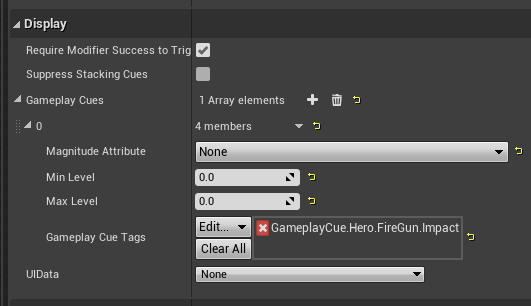
这就要轮到 DamageGameplayEffect 出场了,在 GA_FireGun 中,该变量被指定为了 GE_GunDamage,该 GE 负责伤害的计算以及播放命中效果(GC);在上文的 EventReceived() 的处理中,将该 GE 包装后传递给了生成的子弹 Projectile

image.png

image.png

GDDamageExecCalculation

先来看看这个计算伤害的 Calculation Class 是如何实现的。

1
2
3
4
5
6
7
8
9
10
11
UCLASS()
class GASDOCUMENTATION_API UGDDamageExecCalculation : public UGameplayEffectExecutionCalculation
{
GENERATED_BODY()

public:
UGDDamageExecCalculation();

virtual void Execute_Implementation(const FGameplayEffectCustomExecutionParameters& ExecutionParams, OUT FGameplayEffectCustomExecutionOutput& OutExecutionOutput) const override;
};

该类继承自 GameplayEffectExecutionCalculation 并重写了 Execute_Implementation() 即执行计算的方法,顾名思义,这个类用于伤害的计算。

先来看看 GameplayEffectExecutionCalculation 的概念,以下内容来自于 GASDocumentation_Chinese

GameplayEffectExecutionCalculation(ExecutionCalculation, Execution(你会在插件代码里经常看到这个词)或ExecCalc) 是GameplayEffect对 ASC 进行修改最强有力的方式. 像 ModifierMagnitudeCalculation 一样, 它也可以捕获 Attribute 并选择性地为其创建 Snapshot, 和 MMC 不同的是, 它可以修改多个 Attribute 并且基本上可以处理程序员想要做的任何事. 这种强有力和灵活性的负面就是它是不可预测的且必须在 C++ 中实现。

ExecutionCalculation 只能由即刻(Instant)和周期性(Periodic) GameplayEffect 使用, 插件中所有和"Execute"相关的一般都引用到这两种类型的GameplayEffect

GameplayEffectSpec创建时, Snapshot会捕获Attribute, 而当GameplayEffectSpec应用时, 非Snapshot会捕获Attribute。捕获Attribute会自 ASC 现有的 Modifier 重新计算它们的 CurrentValue, 该重新计算不会执行 AbilitySet中的PreAttributeChange(), 因此所有的限制操作(Clamp)必须在这里重新处理。

快照 Source或Target 在GameplayEffectSpec中捕获
Source 创建
Target 应用
Source 应用
Target 应用

简单来说,ExecutionCalculation 可以实现更复杂的数值处理逻辑并且可以为不同的 Attribute 分别选择是否 SnapShot,所谓 SnapShot 就是指在技能创建的一瞬间捕获属性,非 SnapShot 则是在技能生效时才捕获相应的属性。类似于大家玩游戏时所说的 “锁面板/不锁面板”。

回到 Execute_Implementation() 执行的计算本身,来看一下具体的伤害计算部分:

1
2
3
4
5
6
7
8
9
10
11
12
13
14
15
16
17
18
struct GDDamageStatics
{
DECLARE_ATTRIBUTE_CAPTUREDEF(Armor);
DECLARE_ATTRIBUTE_CAPTUREDEF(Damage);

GDDamageStatics()
{
// Snapshot happens at time of GESpec creation
// We're not capturing anything from the Source in this example,
// but there could be like AttackPower attributes that you might want.

// Capture optional Damage set on the damage GE as a CalculationModifier under the ExecutionCalculation
DEFINE_ATTRIBUTE_CAPTUREDEF(UGDAttributeSetBase, Damage, Source, true);

// Capture the Target's Armor. Don't snapshot.
DEFINE_ATTRIBUTE_CAPTUREDEF(UGDAttributeSetBase, Armor, Target, false);
}
};

GDDamageStatics 的定义中可以看出,该 ExecCalc 一共捕获了两个属性:Damage(Source)、Armor(Target)并且前者使用了 SnapShot 后者没有使用。

1
2
3
4
5
6
7
8
9
10
11
12
13
14
15
16
17
18
19
20
21
22
23
24
25
26
27
28
float Armor = 0.0f;
ExecutionParams.AttemptCalculateCapturedAttributeMagnitude(
DamageStatics().ArmorDef, EvaluationParameters, Armor);
Armor = FMath::Max<float>(Armor, 0.0f);

float Damage = 0.0f;
// Capture optional damage value set on the damage GE as a CalculationModifier under the ExecutionCalculation
ExecutionParams.AttemptCalculateCapturedAttributeMagnitude(
DamageStatics().DamageDef, EvaluationParameters, Damage);
// Add SetByCaller damage if it exists
Damage += FMath::Max<float>(
Spec.GetSetByCallerMagnitude(FGameplayTag::RequestGameplayTag(FName("Data.Damage")), false, -1.0f), 0.0f);

float UnmitigatedDamage = Damage; // Can multiply any damage boosters here

float MitigatedDamage = (UnmitigatedDamage) * (100 / (100 + Armor));

if (MitigatedDamage > 0.f)
{
// Set the Target's damage meta attribute
OutExecutionOutput.AddOutputModifier(
FGameplayModifierEvaluatedData(
DamageStatics().DamageProperty,
EGameplayModOp::Additive,
MitigatedDamage
)
);
}

具体计算方面,将 ArmorDamage 从捕获列表中取出并做了 Clamp,对于 Damage 做了这样的操作:

1
2
Damage += FMath::Max<float>(
Spec.GetSetByCallerMagnitude(FGameplayTag::RequestGameplayTag(FName("Data.Damage")), false, -1.0f), 0.0f);

这就是上文提到的 Projectile->DamageEffectSpecHandle 中携带的内容,通过 GetSetByCallerMagnitude 取出标签为 Data.Damage 的数据,即子弹的伤害。最后再通过一个公式计算最终的伤害并对 OutExecutionOutput 中的 Damage 属性进行修改。

要注意 UnmitigatedDamageMitigatedDamage 的区别,前者是“攻击方”的造成的伤害而后者是“被攻击方”实际受到的伤害,最终传递到被攻击方的也是 MitigatedDamage。这就意味着,一次攻击后,攻击方与被攻击方的 Damage 变量可能是不一样的(由于 Armor 的存在)。

最后还进行了一次广播,但是目前还不知道这个广播的作用是什么。

1
2
3
4
5
6
7
// Broadcast damages to Target ASC
UGDAbilitySystemComponent* TargetASC = Cast<UGDAbilitySystemComponent>(TargetAbilitySystemComponent);
if (TargetASC)
{
UGDAbilitySystemComponent* SourceASC = Cast<UGDAbilitySystemComponent>(SourceAbilitySystemComponent);
TargetASC->ReceiveDamage(SourceASC, UnmitigatedDamage, MitigatedDamage);
}

这就是伤害计算的流程了,也是异常复杂,接下来的 GC 播放就会简单许多。

总结

本节分析了 Jump 技能的完整实现以及 FireGun 技能的一部分实现,本来是想把 FireGun 分析完的,奈何内容实在是太多了,就放到下一节继续分析吧。