前言

上一节我们分析了 GASDocumentation 中与 GAS 相关的一些类的设计,本节就开始分析具体技能的实现。

技能的实现

查看 BP_HeroCharacter 蓝图,会发现在 Abilities.CharacterAbilities 下挂载了 7 个技能,上一节也分析过,CharacterAbilities 会在开局就全部赋予玩家,让我们一一分析。

3.png

Jump

项目中,为了演示非实例化的技能是如何使用的,把 Jump 也作为一个技能配置了,这个技能是 C++ 实现的。查看相应的类:

1
2
3
4
5
6
7
8
9
10
11
12
13
14
15
16
17
18
19
20
21
22
23
24
25
26
27
28
29
30
31
32
33
34
35
36
/**
* Makes the Character try to jump using the standard Character->Jump.
* This is an example of a non-instanced ability.
*/
UCLASS()
class GASDOCUMENTATION_API UGDGA_CharacterJump : public UGDGameplayAbility
{
GENERATED_BODY()

public:
UGDGA_CharacterJump();

virtual void ActivateAbility(
const FGameplayAbilitySpecHandle Handle,
const FGameplayAbilityActorInfo* ActorInfo,
const FGameplayAbilityActivationInfo ActivationInfo,
const FGameplayEventData* TriggerEventData) override;

virtual bool CanActivateAbility(
const FGameplayAbilitySpecHandle Handle,
const FGameplayAbilityActorInfo* ActorInfo,
const FGameplayTagContainer* SourceTags = nullptr,
const FGameplayTagContainer* TargetTags = nullptr,
OUT FGameplayTagContainer* OptionalRelevantTags = nullptr) const override;

virtual void InputReleased(
const FGameplayAbilitySpecHandle Handle,
const FGameplayAbilityActorInfo* ActorInfo,
const FGameplayAbilityActivationInfo ActivationInfo) override;

virtual void CancelAbility(
const FGameplayAbilitySpecHandle Handle,
const FGameplayAbilityActorInfo* ActorInfo,
const FGameplayAbilityActivationInfo ActivationInfo,
bool bReplicateCancelAbility) override;
};

会发现 GDGA_CharacterJump 就是继承自 UGDGameplayAbility 并且重写了 UGameplayAbility 中的一些函数来控制技能的流程。

1
2
3
4
5
6
UGDGA_CharacterJump::UGDGA_CharacterJump()
{
AbilityInputID = EGDAbilityInputID::Jump;
InstancingPolicy = EGameplayAbilityInstancingPolicy::NonInstanced;
AbilityTags.AddTag(FGameplayTag::RequestGameplayTag(FName("Ability.Jump")));
}

在构造函数方面,将 AbilityInputID 绑定至相应的枚举,这样就能通过按键来触发技能了。

1
2
3
4
5
6
7
8
9
10
11
12
13
14
15
16
17
void UGDGA_CharacterJump::ActivateAbility(
const FGameplayAbilitySpecHandle Handle,
const FGameplayAbilityActorInfo * ActorInfo,
const FGameplayAbilityActivationInfo ActivationInfo,
const FGameplayEventData * TriggerEventData)
{
if (HasAuthorityOrPredictionKey(ActorInfo, &ActivationInfo))
{
if (!CommitAbility(Handle, ActorInfo, ActivationInfo))
{
EndAbility(CurrentSpecHandle, CurrentActorInfo, CurrentActivationInfo, true, true);
}

ACharacter * Character = CastChecked<ACharacter>(ActorInfo->AvatarActor.Get());
Character->Jump();
}
}

在 ActivateAbility 我们终于看到了 Jump 技能的真正实现:Character->Jump();。没错,这个技能就是转调用了 Character 自带的 Jump 而已。其他的几个函数就不分析了,都是关于 Ability 取消与停止的一些函数,可以学习一下作者的条件判断。

OK,花了这么大的精力,我们终于实现了跳的功能,不过这可是由 GAS 实现的 Jump,无论是解耦还是可拓展性都很高。

FireGun

分析完了 Jump,我们再来看看 FireGun 功能的实现,这个功能也是利用 C++ 实现的,定义在 GDGA_FireGun.h 中。案例中的玩家控制角色与 AI 角色的所有动画都是持枪的状态,红色与蓝色的小兵则没有持枪。与此相对的,BP_HeroCharacter 的蓝图中,角色要多出一个 Gun_Compotent 的组件,实际上就只是一个 SkeletalMesh Component 而已。

这一点在 GDHeroCharacter.h 中也可以看到:

1
2
3
4
UPROPERTY(BlueprintReadOnly, VisibleAnywhere)
USkeletalMeshComponent* GunComponent;

USkeletalMeshComponent* GetGunComponent() const;

因此,FireGun 技能的作用就是玩家按下鼠标左键时在 Gun_Compotent 的 Muzzle 位置生成一颗子弹,再处理伤害计算、命中特效、玩家被击中的效果等,让我们来看看用 GAS 如何实现这些。

查看 GDGA_FireGun.h,发现这个类也继承自 GDGameplayAbility,并且多出了一些成员的定义。

先看一下成员变量的定义,这里定义了两个 Montage,分别对应不瞄准与瞄准的开枪动画,并且在 ProjectileClass 中存放生成的子弹类,DamageGameplayEffect 则是一个计算伤害的 GE。至于 Range 与 Damage,则是控制子弹的射程与伤害的变量了。

1
2
3
4
5
6
7
8
9
10
11
12
13
14
15
16
17
18
19
20
21
public:
UGDGA_FireGun();

UPROPERTY(BlueprintReadOnly, EditAnywhere)
UAnimMontage* FireHipMontage;

UPROPERTY(BlueprintReadOnly, EditAnywhere)
UAnimMontage* FireIronsightsMontage;

UPROPERTY(BlueprintReadOnly, EditAnywhere)
TSubclassOf<AGDProjectile> ProjectileClass;

UPROPERTY(BlueprintReadOnly, EditAnywhere)
TSubclassOf<UGameplayEffect> DamageGameplayEffect;

protected:
UPROPERTY(BlueprintReadOnly, EditAnywhere)
float Range;

UPROPERTY(BlueprintReadOnly, EditAnywhere)
float Damage;

构造函数

再来查看该技能的构造函数部分。

1
2
3
4
5
6
7
8
9
10
11
12
13
UGDGA_FireGun::UGDGA_FireGun()
{
InstancingPolicy = EGameplayAbilityInstancingPolicy::InstancedPerActor;

FGameplayTag Ability1Tag = FGameplayTag::RequestGameplayTag(FName("Ability.Skill.Ability1"));
AbilityTags.AddTag(Ability1Tag);
ActivationOwnedTags.AddTag(Ability1Tag);

ActivationBlockedTags.AddTag(FGameplayTag::RequestGameplayTag(FName("Ability.Skill")));

Range = 1000.0f;
Damage = 12.0f;
}

这里将 Ability.Skill.Ability1 标签赋予玩家,并在 BlockedTags 中赋予 Ability.Skill,这就意味着玩家在释放任意技能,即拥有任何 Ability.Skill 标签或它的子标签时,都不允许释放其他技能。

通过简单的 Tag 组合,即可实现复杂的效果,这就是 Tag 系统的精妙之处。

此外构造函数中还设置了子弹的范围及伤害。

ActivateAbility

再来查看该技能是如何触发的,即 UGDGA_FireGun::ActivateAbility 函数的实现:

1
2
3
4
5
6
7
8
9
10
11
12
13
14
15
16
17
18
19
20
21
22
23
24
25
26
27
28
29
30
31
32
33
34
35
36
void UGDGA_FireGun::ActivateAbility(
const FGameplayAbilitySpecHandle Handle,
const FGameplayAbilityActorInfo * ActorInfo,
const FGameplayAbilityActivationInfo ActivationInfo,
const FGameplayEventData * TriggerEventData)
{
if (!CommitAbility(Handle, ActorInfo, ActivationInfo))
{
EndAbility(CurrentSpecHandle, CurrentActorInfo, CurrentActivationInfo, true, true);
}

UAnimMontage* MontageToPlay = FireHipMontage;

if (GetAbilitySystemComponentFromActorInfo()->
HasMatchingGameplayTag(FGameplayTag::RequestGameplayTag(FName("State.AimDownSights"))) &&
!GetAbilitySystemComponentFromActorInfo()->
HasMatchingGameplayTag(FGameplayTag::RequestGameplayTag(FName("State.AimDownSights.Removal"))))
{
MontageToPlay = FireIronsightsMontage;
}

// Play fire montage and wait for event telling us to spawn the projectile
UGDAT_PlayMontageAndWaitForEvent* Task =
UGDAT_PlayMontageAndWaitForEvent::PlayMontageAndWaitForEvent(
this, NAME_None, MontageToPlay, FGameplayTagContainer(), 1.0f, NAME_None, false, 1.0f);

Task->OnBlendOut.AddDynamic(this, &UGDGA_FireGun::OnCompleted);
Task->OnCompleted.AddDynamic(this, &UGDGA_FireGun::OnCompleted);
Task->OnInterrupted.AddDynamic(this, &UGDGA_FireGun::OnCancelled);
Task->OnCancelled.AddDynamic(this, &UGDGA_FireGun::OnCancelled);
Task->EventReceived.AddDynamic(this, &UGDGA_FireGun::EventReceived);

// ReadyForActivation() is how you activate the AbilityTask in C++.
// Blueprint has magic from K2Node_LatentGameplayTaskCall that will automatically call ReadyForActivation().
Task->ReadyForActivation();
}

乍一看十分复杂,我们先不管 MontageToPlay 的选择部分,直接看最为核心的一段:

1
2
3
4
5
6
7
8
9
10
11
12
13
14
// Play fire montage and wait for event telling us to spawn the projectile
UGDAT_PlayMontageAndWaitForEvent* Task =
UGDAT_PlayMontageAndWaitForEvent::PlayMontageAndWaitForEvent(
this, NAME_None, MontageToPlay, FGameplayTagContainer(), 1.0f, NAME_None, false, 1.0f);

Task->OnBlendOut.AddDynamic(this, &UGDGA_FireGun::OnCompleted);
Task->OnCompleted.AddDynamic(this, &UGDGA_FireGun::OnCompleted);
Task->OnInterrupted.AddDynamic(this, &UGDGA_FireGun::OnCancelled);
Task->OnCancelled.AddDynamic(this, &UGDGA_FireGun::OnCancelled);
Task->EventReceived.AddDynamic(this, &UGDGA_FireGun::EventReceived);

// ReadyForActivation() is how you activate the AbilityTask in C++.
// Blueprint has magic from K2Node_LatentGameplayTaskCall that will automatically call ReadyForActivation().
Task->ReadyForActivation();

可以看到,这里直接声明了一个 UGDAT_PlayMontageAndWaitForEvent* 类型的 Task 并且绑定了一堆回调,并且在最后让 Task 处于 Ready 状态,按注释来看的话,激活 FireGun 技能就相当于启动了这个 Task。

Task

以下是 GasDocumentation_Chinese 中关于 Task 的介绍,放在这里方便查看:

  1. AbilityTask 定义

GameplayAbility只能在一帧中执行, 这本身并不能提供太多灵活性, 为了实现随时间推移而触发或响应一段时间后触发的委托操作, 我们需要使用AbilityTask。

GAS 自带很多AbilityTask:

  • 使用RootMotionSource移动Character的Task
  • 播放动画蒙太奇的Task
  • 响应Attribute变化的Task
  • 响应GameplayEffect变化的Task
  • 响应玩家输入的Task
  • 更多

UAbilityTask的构造函数中强制硬编码允许最多 1000 个同时运行的AbilityTask, 当设计那些同时拥有数百个 Character 的游戏(像RTS)的 GameplayAbility 时要注意这一点。

  1. 自定义 AbilityTask

通常你需要创建自己的自定义AbilityTask(C++中)。 样例项目带有两个自定义 AbilityTask:

PlayMontageAndWaitForEvent 是默认 PlayMontageAndWait 和 WaitGameplayEventAbilityTask 的结合体, 其允许动画蒙太奇自 AnimNotify 发送 GameplayEvent 回到启动它的 GameplayAbility, 可以使用该 Task 在动画蒙太奇的某个特定时刻来触发操作。

WaitReceiveDamage可以监听OwnerActor接收伤害。当英雄接收到一个伤害实例时, 被动护甲层GameplayAbility 就会移除一层护甲。

AbilityTask 的组成:

  • 创建新的 AbilityTask 实例的静态函数
  • 当 AbilityTask 完成目的时分发的委托(Delegate)
  • 进行主要工作的 Activate() 函数, 绑定到外部的委托等等
  • 进行清理工作的OnDestroy()函数, 包括其绑定到外部的委托
  • 所有绑定到外部委托的回调函数
  • 成员变量和所有内部辅助函数

Note: AbilityTask只能声明一种类型的输出委托, 所有的输出委托都必须是该种类型, 不管它们是否使用参数. 对于未使用的委托参数会传递默认值。

AbilityTask 只能运行在那些运行所属 GameplayAbility 的客户端或服务端, 然而, 可以通过设置 bSimulatedTask = true 使AbilityTask 运行在 Simulated Client 上, 在 AbilityTask 的构造函数中, 重写 virtual void InitSimulatedTask(UGameplayTasksComponent& InGameplayTasksComponent); 并将所有成员变量设置为同步的, 这只在极少的情况下有用, 比如在移动AbilityTask 中, 不想同步每次移动变化, 但是又需要模拟整个移动 AbilityTask, 所有的 RootMotionSource AbilityTask 都是这样做的, 查看 AbilityTask_MoveToLocation.h/.cpp 以作为参考范例。

如果你在 AbilityTask 的构造函数中设置了 bTickingTask = true; 并重写了 virtual void TickTask(float DeltaTime);, AbilityTask 就可以使用 Tick, 这在你需要根据帧率平滑线性插值的时候很有用. 查看 AbilityTask_MoveToLocation.h/.cpp 以作为参考范例。

可以看出,这里使用到的 PlayMontageAndWaitForEvent 是 GAS 中自带的两个 Task 的结合体,负责播放动画并接收事件,直至能力结束或动画播放结束(需手动指定回调),关于 GDAT_PlayMontageAndWaitForEvent.h /.cpp 就不再分析了。属于是心有余而力不足,这里暂且把它当成 BlackBox 看待。

回调函数

上文说到,Task 绑定了许多回调函数用于技能流程的控制,这里分析一下这些回调函数:

1
2
3
4
5
Task->OnBlendOut.AddDynamic(this, &UGDGA_FireGun::OnCompleted);
Task->OnCompleted.AddDynamic(this, &UGDGA_FireGun::OnCompleted);
Task->OnInterrupted.AddDynamic(this, &UGDGA_FireGun::OnCancelled);
Task->OnCancelled.AddDynamic(this, &UGDGA_FireGun::OnCancelled);
Task->EventReceived.AddDynamic(this, &UGDGA_FireGun::EventReceived);

可以看出,无论是动画 BlendOut 或者是 Task 本身结束都会调用 OnCompleted,被打断或取消会调用 OnCancelled,接收到动画的事件时会调用 EventReceived。

并且可以看到这些回调函数确实都是同种类型。

1
2
3
4
5
6
7
8
9
10
11
void UGDGA_FireGun::OnCancelled(FGameplayTag EventTag, FGameplayEventData EventData)
{
EndAbility(CurrentSpecHandle, CurrentActorInfo, CurrentActivationInfo, true, true);
}

void UGDGA_FireGun::OnCompleted(FGameplayTag EventTag, FGameplayEventData EventData)
{
EndAbility(CurrentSpecHandle, CurrentActorInfo, CurrentActivationInfo, true, false);
}

void UGDGA_FireGun::EventReceived(FGameplayTag EventTag, FGameplayEventData EventData);

这里单独分析一下 EventReceived,可以看出该函数处理了两种 Eventtag:Event.Montage.EndAbility 与 Event.Montage.SpawnProjectile,分别用于结束技能与发射子弹。我们也终于看到了熟悉的方向计算与 GetWorld()->SpawnActorDeferred<T>。

这里之所以使用 SpawnActorDeferred 是为了先进行一些配置再手动调用 Projectile->FinishSpawning(MuzzleTransform) 完成生成。

1
2
3
4
5
6
7
8
9
10
11
12
13
14
15
16
17
18
19
20
21
22
23
24
25
26
27
28
29
30
31
32
33
34
35
36
37
38
39
40
41
42
43
44
45
46
47
48
49
50
void UGDGA_FireGun::EventReceived(FGameplayTag EventTag, FGameplayEventData EventData)
{
// Montage told us to end the ability before the montage finished playing.
// Montage was set to continue playing animation even after ability ends so this is okay.
if (EventTag == FGameplayTag::RequestGameplayTag(FName("Event.Montage.EndAbility")))
{
EndAbility(CurrentSpecHandle, CurrentActorInfo, CurrentActivationInfo, true, false);
return;
}

// Only spawn projectiles on the Server.
// Predicting projectiles is an advanced topic not covered in this example.
if (GetOwningActorFromActorInfo()->GetLocalRole() == ROLE_Authority &&
EventTag == FGameplayTag::RequestGameplayTag(FName("Event.Montage.SpawnProjectile")))
{
AGDHeroCharacter* Hero = Cast<AGDHeroCharacter>(GetAvatarActorFromActorInfo());
if (!Hero)
{
EndAbility(CurrentSpecHandle, CurrentActorInfo, CurrentActivationInfo, true, true);
}

FVector Start = Hero->GetGunComponent()->GetSocketLocation(FName("Muzzle"));
FVector End = Hero->GetCameraBoom()->GetComponentLocation() +
Hero->GetFollowCamera()->GetForwardVector() * Range;
FRotator Rotation = UKismetMathLibrary::FindLookAtRotation(Start, End);

FGameplayEffectSpecHandle DamageEffectSpecHandle =
MakeOutgoingGameplayEffectSpec(DamageGameplayEffect, GetAbilityLevel());

// Pass the damage to the Damage Execution Calculation through a SetByCaller value
// on the GameplayEffectSpec
DamageEffectSpecHandle.Data.Get()->SetSetByCallerMagnitude(
FGameplayTag::RequestGameplayTag(FName("Data.Damage")), Damage);

FTransform MuzzleTransform = Hero->GetGunComponent()->GetSocketTransform(FName("Muzzle"));
MuzzleTransform.SetRotation(Rotation.Quaternion());
MuzzleTransform.SetScale3D(FVector(1.0f));

FActorSpawnParameters SpawnParameters;
SpawnParameters.SpawnCollisionHandlingOverride = ESpawnActorCollisionHandlingMethod::AlwaysSpawn;

AGDProjectile* Projectile = GetWorld()->SpawnActorDeferred<AGDProjectile>(
ProjectileClass, MuzzleTransform, GetOwningActorFromActorInfo(),
Hero, ESpawnActorCollisionHandlingMethod::AlwaysSpawn);

Projectile->DamageEffectSpecHandle = DamageEffectSpecHandle;
Projectile->Range = Range;
Projectile->FinishSpawning(MuzzleTransform);
}
}

除了生成 Projectile 之外,还有一些陌生的操作。首先,使用成员变量 DamageGameplayEffect(GE)创建了一个 DamageEffectSpecHandle 并且将当前子弹的伤害 Damage 通过 SetSetByCallerMagnitude 传递给了一个 Tag 为 Data.Damage 的变量,最后再将 DamageEffectSpecHandle 赋给生成的子弹,这样一来子弹就携带了伤害信息。

施加伤害时获取到这个 DamageEffectSpecHandle 再通过 .GetSetByCallerMagnitude() 的方法就可以获取伤害信息了。

至于 DamageEffectSpecHandle 具体代表什么意思,以目前能够理解的程度来看就是一个带有 DamageEffect 等信息的结构体,内部做了一些优化,可能是引用之类的优化吧,使得在传递过程中不用一直复制。

1
2
3
4
5
6
7
8
9
FGameplayEffectSpecHandle DamageEffectSpecHandle = 
MakeOutgoingGameplayEffectSpec(DamageGameplayEffect, GetAbilityLevel());

// Pass the damage to the Damage Execution Calculation through a SetByCaller value
// on the GameplayEffectSpec
DamageEffectSpecHandle.Data.Get()->SetSetByCallerMagnitude(
FGameplayTag::RequestGameplayTag(FName("Data.Damage")), Damage);

Projectile->DamageEffectSpecHandle = DamageEffectSpecHandle;

动画

OK,代码部分分析完毕,来看一下动画部分到底是如何将 EventTag 传递给 Actor 的。我们打开其中一个 Montage,就会发现在动画的流程中触发了两个 Notify,看名字就知道分别负责生成子弹以及结束 Ability,与 EventReceived() 中处理的两个 Tag 相对应。

这里的播放音效以及 EndAbility 的位置都被博主自己调整了。

image.png

这两个 Noitfy 都是 AnimNotify_GenericEventByTag 类型,这个类型使用蓝图实现,非常简单。就是将指定的 EventTag 发送给 Actor。

image.png

这样就使用 GAS 的方式完成了子弹的生成以及技能的结束。

值得一提的是,由于上文中在 ActivationBlockedTags 中增加了 Ability.Skill 以及在技能激活状态下会赋予玩家 Ability.Skill.Ability1。因此 Event.Montage.EndAbility 的位置也可以间接决定玩家的 FireRate,因为在 EndAbility 之前玩家一直都会有 Ability1 这个 Tag,不会再次触发技能。

1
2
3
FGameplayTag Ability1Tag = FGameplayTag::RequestGameplayTag(FName("Ability.Skill.Ability1"));
ActivationOwnedTags.AddTag(Ability1Tag);
ActivationBlockedTags.AddTag(FGameplayTag::RequestGameplayTag(FName("Ability.Skill")));

DamageGameplayEffect

上述的部分分析了由玩家 按下按键 -> 激活技能 -> 播放动画 -> 接收事件 -> 生成子弹 -> 结束技能 的流程,但还有一些更重要的部分没有分析。那就是,伤害该如何计算?

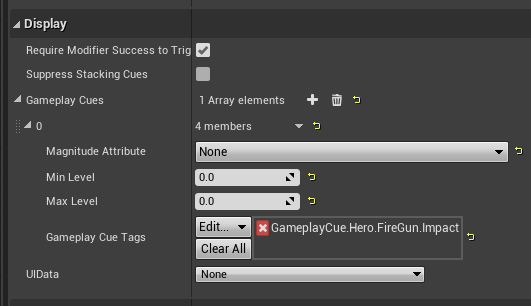
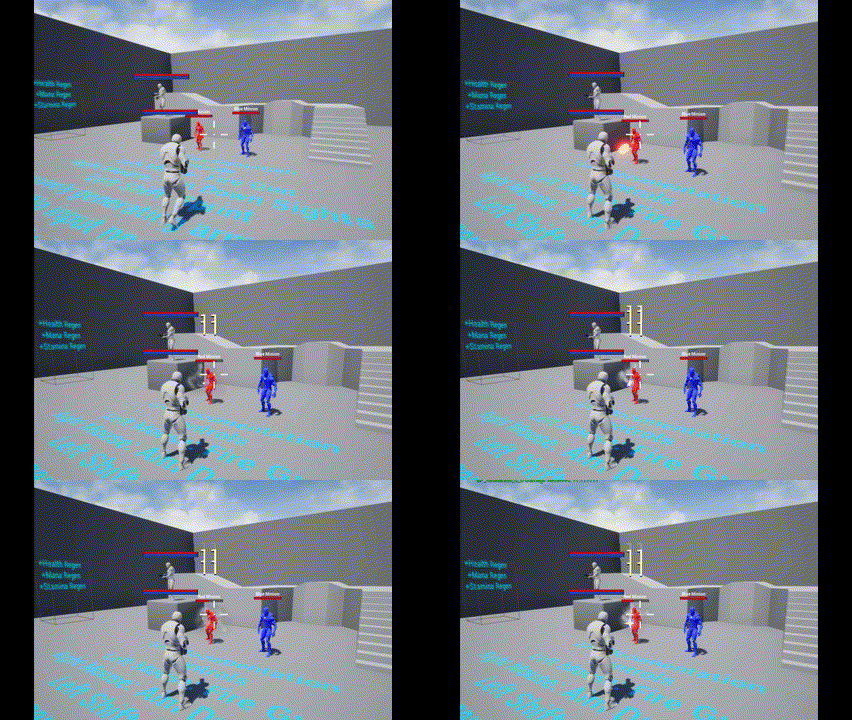
这就要轮到 DamageGameplayEffect 出场了,在 GA_FireGun 中,该变量被指定为了 GE_GunDamage,该 GE 负责伤害的计算以及播放命中效果(GC);在上文的 EventReceived() 的处理中,将该 GE 包装后传递给了生成的子弹 Projectile。

image.png

image.png

GDDamageExecCalculation

先来看看这个计算伤害的 Calculation Class 是如何实现的。

1
2
3
4
5
6
7
8
9
10
11
UCLASS()
class GASDOCUMENTATION_API UGDDamageExecCalculation : public UGameplayEffectExecutionCalculation
{
GENERATED_BODY()

public:
UGDDamageExecCalculation();

virtual void Execute_Implementation(const FGameplayEffectCustomExecutionParameters& ExecutionParams, OUT FGameplayEffectCustomExecutionOutput& OutExecutionOutput) const override;
};

该类继承自 GameplayEffectExecutionCalculation 并重写了 Execute_Implementation() 即执行计算的方法,顾名思义,这个类用于伤害的计算。

先来看看 GameplayEffectExecutionCalculation 的概念,以下内容来自于 GASDocumentation_Chinese:

GameplayEffectExecutionCalculation(ExecutionCalculation, Execution(你会在插件代码里经常看到这个词)或ExecCalc) 是GameplayEffect对 ASC 进行修改最强有力的方式. 像 ModifierMagnitudeCalculation 一样, 它也可以捕获 Attribute 并选择性地为其创建 Snapshot, 和 MMC 不同的是, 它可以修改多个 Attribute 并且基本上可以处理程序员想要做的任何事. 这种强有力和灵活性的负面就是它是不可预测的且必须在 C++ 中实现。

ExecutionCalculation 只能由即刻(Instant)和周期性(Periodic) GameplayEffect 使用, 插件中所有和"Execute"相关的一般都引用到这两种类型的GameplayEffect。

当GameplayEffectSpec创建时, Snapshot会捕获Attribute, 而当GameplayEffectSpec应用时, 非Snapshot会捕获Attribute。捕获Attribute会自 ASC 现有的 Modifier 重新计算它们的 CurrentValue, 该重新计算不会执行 AbilitySet中的PreAttributeChange(), 因此所有的限制操作(Clamp)必须在这里重新处理。

快照 Source或Target 在GameplayEffectSpec中捕获
是 Source 创建
是 Target 应用
否 Source 应用
否 Target 应用

简单来说,ExecutionCalculation 可以实现更复杂的数值处理逻辑并且可以为不同的 Attribute 分别选择是否 SnapShot,所谓 SnapShot 就是指在技能创建的一瞬间捕获属性,非 SnapShot 则是在技能生效时才捕获相应的属性。类似于大家玩游戏时所说的 “锁面板/不锁面板”。

回到 Execute_Implementation() 执行的计算本身,来看一下具体的伤害计算部分:

1
2
3
4
5
6
7
8
9
10
11
12
13
14
15
16
17
18
struct GDDamageStatics
{
DECLARE_ATTRIBUTE_CAPTUREDEF(Armor);
DECLARE_ATTRIBUTE_CAPTUREDEF(Damage);

GDDamageStatics()
{
// Snapshot happens at time of GESpec creation
// We're not capturing anything from the Source in this example,
// but there could be like AttackPower attributes that you might want.

// Capture optional Damage set on the damage GE as a CalculationModifier under the ExecutionCalculation
DEFINE_ATTRIBUTE_CAPTUREDEF(UGDAttributeSetBase, Damage, Source, true);

// Capture the Target's Armor. Don't snapshot.
DEFINE_ATTRIBUTE_CAPTUREDEF(UGDAttributeSetBase, Armor, Target, false);
}
};

在 GDDamageStatics 的定义中可以看出,该 ExecCalc 一共捕获了两个属性:Damage(Source)、Armor(Target)并且前者使用了 SnapShot 后者没有使用。

1
2
3
4
5
6
7
8
9
10
11
12
13
14
15
16
17
18
19
20
21
22
23
24
25
26
27
28
float Armor = 0.0f;
ExecutionParams.AttemptCalculateCapturedAttributeMagnitude(
DamageStatics().ArmorDef, EvaluationParameters, Armor);
Armor = FMath::Max<float>(Armor, 0.0f);

float Damage = 0.0f;
// Capture optional damage value set on the damage GE as a CalculationModifier under the ExecutionCalculation
ExecutionParams.AttemptCalculateCapturedAttributeMagnitude(
DamageStatics().DamageDef, EvaluationParameters, Damage);
// Add SetByCaller damage if it exists
Damage += FMath::Max<float>(
Spec.GetSetByCallerMagnitude(FGameplayTag::RequestGameplayTag(FName("Data.Damage")), false, -1.0f), 0.0f);

float UnmitigatedDamage = Damage; // Can multiply any damage boosters here

float MitigatedDamage = (UnmitigatedDamage) * (100 / (100 + Armor));

if (MitigatedDamage > 0.f)
{
// Set the Target's damage meta attribute
OutExecutionOutput.AddOutputModifier(
FGameplayModifierEvaluatedData(
DamageStatics().DamageProperty,
EGameplayModOp::Additive,
MitigatedDamage
)
);
}

具体计算方面,将 Armor 与 Damage 从捕获列表中取出并做了 Clamp,对于 Damage 做了这样的操作:

1
2
Damage += FMath::Max<float>(
Spec.GetSetByCallerMagnitude(FGameplayTag::RequestGameplayTag(FName("Data.Damage")), false, -1.0f), 0.0f);

这就是上文提到的 Projectile->DamageEffectSpecHandle 中携带的内容,通过 GetSetByCallerMagnitude 取出标签为 Data.Damage 的数据,即子弹的伤害。最后再通过一个公式计算最终的伤害并对 OutExecutionOutput 中的 Damage 属性进行修改。

要注意 UnmitigatedDamage 与 MitigatedDamage 的区别,前者是“攻击方”的造成的伤害而后者是“被攻击方”实际受到的伤害,最终传递到被攻击方的也是 MitigatedDamage。这就意味着,一次攻击后,攻击方与被攻击方的 Damage 变量可能是不一样的(由于 Armor 的存在)。

最后还进行了一次广播,但是目前还不知道这个广播的作用是什么。

1
2
3
4
5
6
7
// Broadcast damages to Target ASC
UGDAbilitySystemComponent* TargetASC = Cast<UGDAbilitySystemComponent>(TargetAbilitySystemComponent);
if (TargetASC)
{
UGDAbilitySystemComponent* SourceASC = Cast<UGDAbilitySystemComponent>(SourceAbilitySystemComponent);
TargetASC->ReceiveDamage(SourceASC, UnmitigatedDamage, MitigatedDamage);
}

这就是伤害计算的流程了,也是异常复杂,接下来的 GC 播放就会简单许多。

总结

本节分析了 Jump 技能的完整实现以及 FireGun 技能的一部分实现,本来是想把 FireGun 分析完的,奈何内容实在是太多了,就放到下一节继续分析吧。